Stock Screener, AI Scanner
- 4.3
- Rating
- 1.00M
- Installs
- Free
- Price
 Analysis by App-foxy
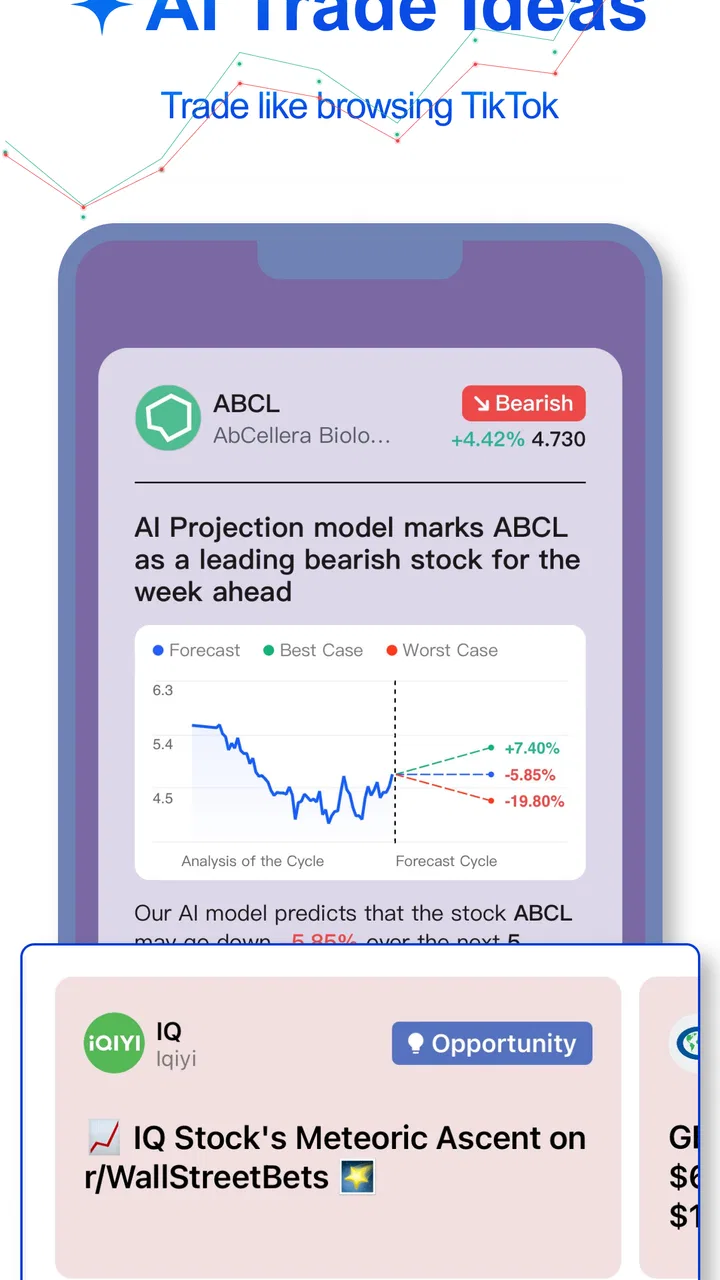
I approached Stock Screener, AI Scanner as a practical research companion rather than a magic investing machine. My overall impression is that it is most useful when I already have a question—such as which companies deserve a closer look—and want a faster way to organize that first investigation. The app combines an AI assistant, stock-screening tools, charts, and financial news in one finance-focused workspace. That combination makes it more approachable than opening several separate services, although it also means I have to treat its suggestions as starting points, not ready-made investment decisions.
Created by AInvest Fintech, Inc., this free app is aimed at people who want to explore the market from a phone. Its average rating is 4.3 from roughly 3.9 thousand ratings, and it has passed the one-million-install mark. Those figures suggest that it has found an audience beyond professional traders, which matches my experience: the interface and workflow feel designed for curious individuals who want more structure than a basic news feed but less complexity than a full desktop terminal.
What makes the research workflow useful
The central appeal is the way Stock Screener, AI Scanner brings several early-stage research tasks together. I can begin with a broad idea, use the AI feature to shape the question, inspect a list of possible stocks, open a chart, and then read related news without constantly switching between unrelated apps. That flow is especially helpful when I am trying to understand a sector rather than track one company I already know well.
You May Also Like

 Blood Strike: 2.5 Anniversary
Blood Strike’s Loadouts Turn Every Drop Into a Tactical Gamble
A close look at Blood Strike’s custom loadouts: how fast access to signature weapons reshapes its battle royale rhythm, rewards preparation, and narrows the gap between fights.

 Pandora - Music & Podcasts
Pandora’s Music Is Easy to Start, but Harder to Recover
Pandora’s strength is its low-effort path from a seed to a station. Its weak spot is how much confidence it asks you to place in connection, setup, and quiet recovery.

 8 Ball Pool
 Is Built on Rivalries, Rematches, and Routine
A close look at the rivalries, rematches, shared routines, and unanswered safety questions that turn a quick pool match into a persistent mobile community.

 Samsung Music
’s Quiet Strength Is Playing What You Already Own
Its reach comes less from spectacle than from dependable access to a personal library. That simplicity is both the app’s strongest retention engine and its ceiling.

 AccuWeather: Weather Radar
AccuWeather Review: A Quick, Clear Forecast for Everyday Decisions
For everyday plans, the best forecast is the one you can understand quickly. AccuWeather makes rain timing, radar, and local conditions easy to act on, with a few trade-offs.

 Hill Climb Racing
Why Hill Climb Racing Still Turns Crashes Into One More Run
A tiny car, a bumpy hill and one more upgrade: Hill Climb Racing keeps resurfacing because its simple chaos makes every near-miss feel personal.
More From Our News Desk



The AI element is best understood as a conversation layer over the research process. Instead of starting with a long list of technical filters, I can phrase an interest in ordinary language and use the response to decide what to examine next. This lowers the barrier for a newcomer who may not know the difference between common screening concepts. It also helps experienced users move quickly from a general thought to a shortlist that can be checked more carefully.
Still, I would not let the conversational format create false confidence. An AI answer can sound clear even when the question is too broad, the market context has changed, or the answer needs more verification. My preferred habit is to ask a narrow question, note the names or themes it surfaces, and then inspect the chart and news independently. That turns the assistant into a research accelerator instead of a substitute for judgment.
Screening works best when I start with a purpose
The stock scanner becomes more valuable when I give it a defined job. For example, I might be looking for companies in one industry, reviewing possible candidates after a market move, or building a watchlist for further reading. A vague search for “good stocks” is much less useful than a question tied to a timeframe, a sector, or a type of business I am prepared to investigate.
One of the less obvious advantages is that screening can prevent me from spending all my time on familiar names. News-heavy finance apps tend to keep showing the companies already attracting attention. A scanner encourages a different habit: begin with a condition or theme, then inspect the results. That can broaden the research process, but it also increases the need to check each result carefully because a screen can surface an interesting match without proving that the company is suitable for my goals.
I also found it sensible to save the reasoning behind a shortlist outside the app. A name may appear attractive today because of a recent event, while my original investment idea may depend on a longer trend. Writing down why I selected a company makes it easier to notice when I am merely reacting to headlines. The app helps with discovery; my own notes provide the discipline that the screen cannot supply.
Charts add context that a headline cannot
The chart view is important because a news item by itself rarely tells me how the market has already responded. After reading about a company or sector, I can look at its price movement and ask whether the story is new, already reflected in the market, or part of a longer pattern. That extra step is one of the strongest reasons to use this app instead of relying on a general news reader.
I do not use a chart as a prediction tool. I use it to frame better questions. A sharp move may prompt me to investigate the cause, while a long period of weakness may make me examine whether the news is genuinely changing the business or simply creating temporary excitement. This is a more grounded workflow than treating a rising line as an automatic buy signal.
The limitation is that a compact mobile chart cannot replace the full analytical environment some active traders expect. Someone who needs highly specialized chart studies, extensive order tools, or a desktop-style layout may prefer a dedicated brokerage or market-analysis platform. Stock Screener, AI Scanner is stronger at connecting discovery, explanation, and context than at serving as a complete professional trading terminal.
News is helpful, but I have to read it skeptically
Having market news beside the scanner makes the app feel more complete. When a company appears in a search, the related news can help explain why it has attracted attention. I can also use headlines to generate follow-up questions for the AI assistant, then return to the chart to see whether the market reaction matches the apparent importance of the story.
My main caution is that news can pull the workflow toward short-term excitement. A stream of fresh headlines naturally makes urgent decisions feel more important than they are. I get better results when I read the news after defining what I am trying to learn. Otherwise, the most dramatic headline can quietly replace the original research question.
A useful routine is to separate discovery from decision-making. During discovery, I allow the app to show unfamiliar companies and recent developments. During decision-making, I slow down, compare multiple pieces of information, and ask whether the idea still makes sense without the newest headline. That distinction is not a special button inside the app; it is the habit that makes its tools more reliable.
Where the app falls short
The biggest weakness is the risk of overtrusting convenience. Stock Screener, AI Scanner makes it easy to move from a question to a list of stocks, but the smoothness of that process can hide how much work remains. A screen does not explain every business risk, an AI response does not remove uncertainty, and a chart does not reveal the complete health of a company.
I would be particularly careful if I were new to investing and expected the app to tell me exactly what to buy. Its wording may help me explore ideas, but I still need to understand what I am looking at and why it matters. The app is not a replacement for learning basic financial terms, considering personal risk, or checking information through dependable sources.
There is also a practical cost consideration. The app is free to download, but it includes in-app purchases ranging from $1.99 to $699.99 per item. That wide range means I would review any purchase screen carefully before confirming anything. A free entry point is appealing, yet users should not assume that every useful capability will necessarily remain part of the no-cost experience.
For a casual investor, the number of available research paths may sometimes feel like too much. AI prompts, screens, charts, and news each encourage a different kind of attention. I found it easier to use when I followed a fixed sequence: define the question, create a shortlist, inspect the chart, read the news, and write down what would make me reject the idea. Without that structure, it is easy to browse endlessly without reaching a clearer conclusion.
How it compares with familiar alternatives
Compared with a standard finance-news app, this one offers a more active research process. A news app is often better when I only want a quick market update, while Stock Screener, AI Scanner gives me more ways to turn a topic into a list of companies and then investigate them. The trade-off is that the extra tools demand more attention and do not automatically improve the quality of my decisions.
Compared with a brokerage app, its emphasis is different. A brokerage is the natural choice when I need account management and transaction-focused features. This app is more comfortable as a research layer before I decide whether an idea deserves attention elsewhere. I would not install it expecting it to replace the app I use for managing investments.
Compared with a specialist charting service, it is less compelling for someone whose entire routine revolves around advanced technical analysis. Its advantage is the connection between AI-assisted discovery, screening, market charts, and news. If I value breadth and a guided starting point, that combination is convenient. If I need deep customization and highly detailed trading tools, a specialist platform is likely the better fit.
Everyday ways I would use it
Imagine I have twenty minutes after work and keep hearing about a particular industry. I can ask the AI assistant to help me identify companies connected with that theme, use the scanner to narrow the field, check the charts for unusual recent movement, and read the news attached to the names that remain. I would not buy anything during that session. I would create a short research list and return to it later, when the initial excitement has faded.
Another useful routine is a weekly watchlist review. I can revisit a few companies, look for meaningful changes in their charts or news, and remove names that no longer match my original reason for tracking them. This is more productive than checking prices repeatedly throughout the day because it gives every search a purpose. The app’s tools support that process, but the value comes from setting a boundary around how often I react.
I can also use it as a learning aid. When I encounter an unfamiliar market term or company category, asking the AI feature for a plain-language explanation can give me a starting point. I would then verify the concept through additional reading, but the conversational approach may be less intimidating than opening a dense reference page. That makes the app suitable for building confidence gradually, provided I remain aware of the difference between an explanation and personalized financial advice.
Who should install it—and who should skip it
I think it is a good match for a curious investor who wants one place to explore stock ideas, compare market context, and read news. It is also useful for someone who finds traditional screeners too technical at first but still wants more control than a simple list of trending stocks. The free starting point makes it easy to test the workflow before deciding whether it belongs in a regular research routine.
I would recommend it less strongly to an active trader who needs rapid execution, highly specialized charting, or a full professional terminal. I would also tell a complete beginner not to treat the AI feature as a personal adviser. The app can help organize questions, but it cannot decide whether a particular investment fits an individual’s finances, time horizon, or tolerance for loss.
Device compatibility is reasonably accessible for Android users: the current version is 5.0.2.1 and requires Android 8.0 or later. The content rating is Everyone, so the app is presented for a broad audience, although the subject itself still calls for mature financial judgment. The product is listed as an app rather than a game, and that is reflected in its focused, research-oriented design.
My final assessment
After using it as a research tool, I see Stock Screener, AI Scanner as a useful bridge between a basic market-news feed and a more demanding analysis platform. Its strongest quality is not any single feature; it is the handoff between asking a question, finding candidates, checking charts, and reading relevant news. That connected workflow can save time and make stock research feel less fragmented.
Its weakness is equally clear: convenience can be mistaken for certainty. I would never allow an AI-generated idea, a screen result, or a striking chart to become my entire investment case. The app works best when I use it to create a shortlist, challenge my first impression, and decide what deserves deeper independent research.
My recommendation is simple: install it if you want a friendly, mobile-first way to explore stocks and you are willing to verify what you find. Skip it if you are looking for a brokerage replacement or a highly advanced trading workstation. For the right user, Stock Screener, AI Scanner is a convenient first pass through the market—valuable for discovery, but strongest when paired with patience, outside checking, and a clear personal strategy.
FAQs for Stock Screener, AI Scanner
01What is Stock Screener, AI Scanner and how does it work?
Stock Screener, AI Scanner is a powerful app designed to help users analyze and identify potential investment opportunities in the stock market. It utilizes advanced AI algorithms to scan and screen stocks based on various criteria such as market trends, financial indicators, and user preferences. This intuitive tool provides real-time insights and personalized recommendations, making it easier for both novice and experienced investors to make informed decisions.
02Is Stock Screener, AI Scanner suitable for beginners?
Yes, Stock Screener, AI Scanner is designed to be user-friendly, catering to both beginners and experienced investors. The app offers a straightforward interface with comprehensive tutorials and guides to help new users understand how to use the screening features effectively. Additionally, the AI-driven insights are presented in an accessible manner, allowing beginners to grasp complex market dynamics with ease.
03What platforms is Stock Screener, AI Scanner available on?
Stock Screener, AI Scanner is available for download on both Android and iOS platforms. Users can find the app on the Google Play Store for Android devices and the Apple App Store for iOS devices. The app is optimized to provide a seamless experience across different devices, ensuring that you can access its features regardless of your smartphone or tablet model.
04Does Stock Screener, AI Scanner require a subscription?
Stock Screener, AI Scanner offers a freemium model, allowing users to access basic features at no cost. However, for advanced capabilities such as premium stock analysis tools, detailed insights, and personalized recommendations, users can opt for a subscription plan. Various subscription tiers are available, catering to different needs and budgets, providing flexibility in accessing enhanced functionalities.
05How secure is my data on Stock Screener, AI Scanner?
The app prioritizes user data security and employs robust encryption protocols to safeguard personal information. Stock Screener, AI Scanner adheres to industry-standard privacy practices and does not share user data with third parties without consent. Regular updates and security patches are implemented to ensure the app remains secure, providing users with peace of mind while using its features.
Pros
- User-friendly interface for quick navigation.
- Customizable alerts for stock movements.
- Comprehensive data visualizations available.
- Real-time data for accurate decision-making.
- AI-driven insights for smarter analysis.
Cons
- Limited features in the free version.
- Occasional lag with heavy data loads.
- Requires internet for optimal performance.
- Some advanced tools can be overwhelming.
- Subscription costs may be high for some.

Stock Screener, AI Scanner
Gallery